Lawn Mowing Simulator 2
Lawn Mowing Simulator 2 Beginner Guide: Core Tips
Learn how to approach contracts, manage grass, use the new leaf-blowing tools, and grow your lawn care business in Lawn Mowing Simulator 2.
Price Comparison
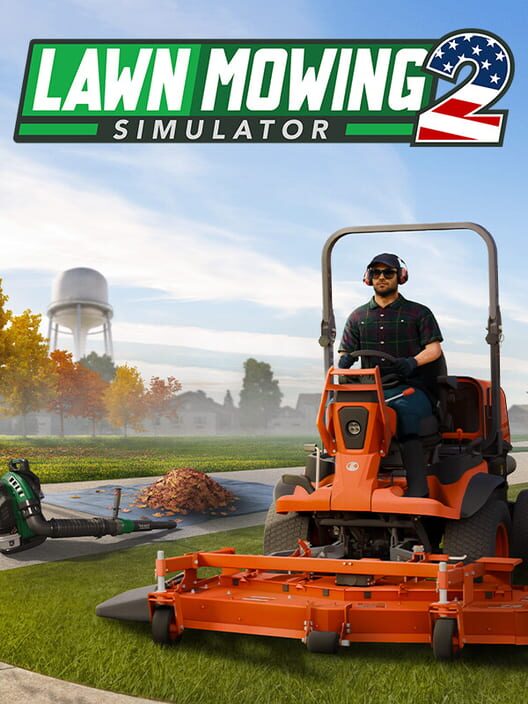
This Lawn Mowing Simulator 2 beginner guide explains how to approach your first contracts, choose the right tool for each job, and build an efficient lawn care business. The sequel moves the series to the United States and expands the job loop with new grass technology, leaf blowers, string trimmers, weed clearance, and a rebuilt career mode. It launched on September 23, 2026, for PC, PlayStation 5, and Xbox Series X|S.
Understand the Main Gameplay Loop
Lawn Mowing Simulator 2 is built around completing professional lawn care contracts. Each job asks you to improve and maintain an outdoor space, but mowing is only one part of the work. Depending on the location and contract, you may need to cut grass, trim around edges, clear weeds, or remove leaves and grass clippings.
The best approach is to treat every contract as a sequence of preparation, cutting, cleanup, and inspection. Rushing directly into mowing can leave debris behind or make it harder to reach awkward areas. Walk around the property first and identify narrow passages, flower beds, trees, fences, slopes, and any areas that require a handheld tool.
Contracts take place across residential, commercial, and municipal locations. The PlayStation store listing confirms that the game includes 11 locations, with many offering multiple contracts that vary in size and theme. This gives you reasons to adjust your approach instead of using exactly the same route on every job.
Inspect the Lawn Before You Mow
The new grass system makes the difference between cut and uncut areas easier to see, while flowers, weeds, and greater variation in grass height affect how a lawn looks before and after work. Use the opening moments of a job to inspect the property rather than immediately starting the engine.
Look for the areas that will determine your route. A large open lawn is usually easiest to handle with a riding mower, while narrow strips beside buildings or landscaping may require a smaller machine or string trimmer. Keep track of obstacles that could force you to reverse or turn repeatedly, because planning around them can save time and reduce unnecessary passes.
It is also useful to identify the edges of the playable work area. Cutting in a consistent direction around the perimeter first can create a clear boundary for the rest of the job. From there, work across the open space in straight, overlapping passes. This makes missed patches easier to spot and helps you maintain a consistent finish.
Choose Equipment for the Contract
Lawn Mowing Simulator 2 includes licensed equipment from Kubota, SCAG, and STIGA, along with new mowers, string trimmers, and leaf blowers. Equipment selection should be based on the property rather than on which machine looks most powerful.
Use a mower that fits the size and shape of the lawn. A larger machine can cover open ground efficiently, but it may be awkward around tight corners, garden borders, or narrow access points. A smaller mower or string trimmer is often more practical when precision matters more than raw coverage.
String trimmers are especially important around edges and obstacles. Use them after the main mowing pass to clean up areas that the mower cannot reach safely. Avoid treating the trimmer as a replacement for the mower across the entire property, because it is better suited to detail work.
Before accepting a contract, consider whether you have the equipment needed to complete every task comfortably. A job involving leaves or difficult borders can take much longer if you rely on a mower alone.
How to Mow Efficiently
Start With the Perimeter
Begin by creating a pass around the outside of the main lawn. This gives you room to turn and establishes a visible border between completed and unfinished grass. It also helps reveal obstacles before you commit to long straight runs.
Use Straight, Overlapping Passes
Once the perimeter is clear, mow in parallel lines across the largest open section. Slightly overlap each pass so that narrow strips of uncut grass are not left between runs. The improved grass visuals make missed sections more obvious, but a deliberate route is still faster than correcting scattered patches later.
Slow Down Near Landscaping
Flowers, weeds, trees, fences, and other landscaping features are part of the lawn's makeup. Approach them carefully and switch to a more precise tool when the mower cannot reach the edge cleanly. The goal is not simply to remove as much vegetation as possible; it is to complete the requested work without damaging the property.
Leave Detailed Cleanup Until the Main Cut Is Complete
Finishing the broad mowing work first gives you a better view of what remains. Afterward, use the string trimmer for borders and tight spaces, then deal with leaves, clippings, or other debris. This order reduces the chance of disturbing an area you have already cleaned.
Use Leaf Blowers and the Tarp Correctly
Leaf blowing is one of the major additions in Lawn Mowing Simulator 2. The game also provides a rake for areas that are difficult to reach with the blower. Do not assume that blowing leaves into a random corner completes the task. The intended cleanup process involves moving leaves onto a tarp, collecting them until the tarp is full, and then emptying the tarp into a debris bag.
Work in small sections and push debris toward a predictable collection point. Keeping the pile compact makes it easier to fill the tarp and reduces the amount of repeated blowing. Use the rake when leaves are trapped in narrow spaces or positioned where the blower is less effective.
Grass clippings are also part of the cleanup system, so inspect the property after mowing even if there were few leaves present. A lawn can look cut while still requiring additional debris removal.
Build Your Business Carefully
The career mode has been overhauled around a fully explorable headquarters and business management. As your operation grows, focus first on completing work consistently and learning which equipment suits different contracts. Buying every available upgrade immediately can leave you with less flexibility for future jobs.
Prioritize equipment that removes a recurring limitation. If you regularly struggle with narrow borders, a better precision tool may be more useful than a larger mower. If leaf-heavy contracts are slowing you down, equipment that improves cleanup can have a greater effect on your workflow.
Keep your spending connected to the contracts you can complete reliably. A machine is valuable when it helps you finish more jobs, handle larger properties, or reduce the time spent on repetitive cleanup. Cosmetic customization can wait until your core operation is stable.
Tips for Better Results
- Walk the property before starting the first machine.
- Choose equipment according to lawn size, obstacles, and contract tasks.
- Complete the main mowing passes before detailed trimming.
- Use consistent lines and slight overlap to reduce missed grass.
- Slow down near flowers, trees, fences, and other landscaping.
- Use a rake for tight spaces where the leaf blower is inconvenient.
- Move leaves and clippings toward one controlled collection area.
- Inspect the entire job after cleanup before leaving the property.
- Invest in equipment that solves repeated problems in your contracts.
- Expect familiar locations to change over time, since gardens can receive new features such as flower beds, pools, or flagpoles.
Is Lawn Mowing Simulator 2 Easy for New Players?
Yes, the basic loop is accessible, but the game rewards patience and planning more than speed. New players should focus on learning the shape of each property, matching tools to tasks, and completing cleanup thoroughly. The relaxing presentation does not remove the need to manage equipment and work order, especially on larger contracts.
The most important beginner habit is to avoid treating every job as a simple mowing challenge. Lawn Mowing Simulator 2 is a broader lawn care simulator. A clean result depends on preparation, accurate cutting, edge work, and debris removal. Once that sequence becomes familiar, larger contracts become easier to organize and the business-management systems have more room to matter.
Sources
FAQ
Frequently Asked Questions
When did Lawn Mowing Simulator 2 release?
Lawn Mowing Simulator 2 released on September 23, 2026.
What platforms is Lawn Mowing Simulator 2 available on?
It is available on PC, PlayStation 5, and Xbox Series X|S.
What new tools are in Lawn Mowing Simulator 2?
The game adds leaf blowers and a rake alongside new mowers and string trimmers. Leaf blowers can be used to move leaves and grass clippings onto a tarp for collection.
How should beginners approach a mowing contract?
Inspect the property first, choose equipment based on the lawn and obstacles, mow the open areas in overlapping lines, then finish with edge trimming and debris cleanup.
Does Lawn Mowing Simulator 2 include a career mode?
Yes. The game includes an overhauled career mode with an explorable headquarters for running and expanding your lawn care business.
Platforms
PC (Microsoft Windows), PlayStation 5, Xbox Series X|S
Genres
Simulator, Strategy
Themes
Non-fiction
Game Modes
Single player
Player Perspectives
First person, Third person
Companies
Skyhook Games