
Shelves and Sorcery: Tidy Up the Enchanted Shop
Shelves and Sorcery Beginner Guide: How to Organize Every Shop
Learn how Shelves and Sorcery works, which mode to choose first, how Sorceries and Enchantments help, and how to approach all three fantasy shops.
Price Comparison
Shelves and Sorcery: Tidy Up the Enchanted Shop is a cozy organization game about restoring order to three fantasy shops. The basic objective is straightforward: pick up misplaced items, identify where they belong, and return them to the correct shelves or displays. New players should begin in Casual Mode, learn the layout of a shop, and use the game's Sorceries and Enchantments as they unlock them. This approach lets you understand the organizing system before attempting timed runs or larger shops.
How Shelves and Sorcery Works
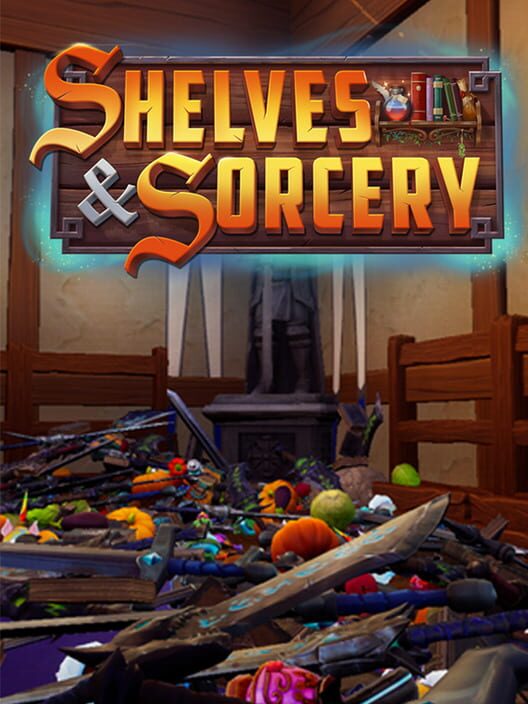
Each shop begins in a state of disorder, with weapons, potions, spellbooks, food, magical curiosities, and other objects scattered throughout the environment. Your job is to collect those items and place them where they belong. The game is built around the satisfaction of gradually transforming a chaotic room into an organized store.
The three shops have different sizes and settings. The Hearth & Barrel contains 1,048 items and serves as the smallest introduction. The Merchant's Rest contains 3,085 items, making it a substantially larger organizing challenge. The Grand Athenaeum is the largest shop, with 4,066 items spread across its floating-isle setting.
Because the shops contain thousands of objects, progress depends on developing a reliable route through each location. Instead of moving randomly between shelves, pay attention to where item groups appear and where their destinations are located. Over time, you can reduce unnecessary movement and make each organizing session more efficient.
Choose Casual Mode First
Casual Mode is the best starting point for most players because it removes the timer. You can explore the shop, identify its storage areas, and organize items without the pressure of a leaderboard run. This is especially useful in The Hearth & Barrel, where you can learn the core interaction before facing the larger spaces.
Use your first Casual session to answer three practical questions: where are the major shelves, which areas contain loose items, and how far must you travel between common pickup and drop-off points? You do not need to finish with an optimized route. The goal is to build a mental map of the shop.
Casual Mode also gives you time to notice the atmosphere and inspect the arrangement of each store. Since the game does not require a combat build or a dialogue choice, learning the environment is the most important early skill.
Understand the Four Game Modes
Casual Mode
Casual Mode has no timer or leaderboard pressure. It is designed for players who want to organize at their own pace and is the natural place to learn a new shop.
Timed Mode
Timed Mode turns organization into a speed challenge. You can compete on global leaderboards by learning the shop layout, improving your route, and using Sorceries and Enchantments effectively. Start timed attempts only after you are comfortable locating the major shelves and item areas.
Archmage Mode
Archmage Mode begins with every Sorcery and Enchantment unlocked. This gives you access to the full magical toolkit from the start and lets you experience how powerful an experienced shopkeeper can become. It can also help you understand the purpose of abilities before earning them through normal progress.
No Magic Mode
No Magic Mode removes Sorceries and Enchantments. It is a pure organization challenge based on movement, item knowledge, and route planning. Treat it as an advanced variation unless you specifically want to practice the game's non-magical fundamentals.
Use Sorceries to Reduce Repetitive Work
Sorceries are magical tools that help you deal with the scale of each shop. According to the official game description, they can gather matching items from around the shop, reveal objects that are difficult to find, or send items toward the shelves where they belong.
Do not think of Sorceries as replacements for learning the environment. They are most useful when combined with a good understanding of the shop. Once you know where a category belongs, a spell that gathers or moves related objects can save time and reduce backtracking. A revealing ability is particularly valuable when a misplaced object is hidden among the shop's clutter.
As you organize more of a shop, your magical toolkit becomes stronger. This creates a useful progression loop: organizing gives you access to better assistance, and better assistance makes larger or more demanding organizing tasks easier to manage.
Make Use of Enchantments
Enchantments permanently improve the shopkeeper's abilities and change how you move through each shop. The listed upgrades include carrying more items at once, increasing reach, moving faster, jumping higher, and eventually taking to the air.
These improvements matter because movement and carrying capacity are central to every organizing task. A larger carrying capacity can reduce trips between pickup areas and shelves. More reach can make awkward placements easier. Faster movement improves long routes, while increased jumping ability and flight can open up more efficient ways to navigate the environment.
When learning a shop, focus first on understanding its structure. Once you begin chasing faster times, consider how each Enchantment affects your route. An upgrade that seems modest during a relaxed session can have a larger impact when repeated across thousands of items.
Progress from the Smallest Shop to the Largest
The Hearth & Barrel is the most practical place to begin because it contains the fewest items. Use it to learn the game's pickup and placement rhythm, identify how item categories are distributed, and become comfortable with the available magic.
Move on to The Merchant's Rest when you can navigate the first shop without constantly stopping to search for basic destinations. Its 3,085 items create a much larger test of memory and route planning. Break the shop into sections and work systematically instead of trying to remember the entire layout at once.
The Grand Athenaeum is the largest challenge, with 4,066 items. Its size makes organization strategy more important than ever. Before attempting a fast run, complete a relaxed pass through the shop and learn the locations that cause the most travel. You can then use that knowledge with your Sorceries and Enchantments to refine the route.
Tips for Faster Timed Runs
- Learn a shop in Casual Mode before entering Timed Mode.
- Plan routes that minimize repeated travel between the same areas.
- Use gathering or item-revealing Sorceries when searching becomes the main source of delay.
- Use movement Enchantments to shorten long trips and reach difficult locations.
- Group your work by nearby areas when possible rather than crossing the shop for every individual item.
- Repeat the same route and adjust one problem section at a time.
Timed Mode rewards familiarity more than reckless speed. A consistent route is usually easier to improve than an improvised run. After each attempt, identify where you lost time, such as searching for a destination, carrying too few items, or taking an inefficient path. Then change that section on the next attempt.
What New Players Should Expect
Shelves and Sorcery is a single-player organization game with a relaxing foundation and optional competitive elements. Steam lists support for Steam Achievements, Steam Cloud, Steam Leaderboards, and Family Sharing. The game released on PC through Steam on August 11, 2026.
The minimum listed requirements include Windows 10 or higher, a 64-bit processor and operating system, a quad-core Intel or AMD processor running at 2.5 GHz or faster, 8 MB of RAM, a DirectX 11 or 12-compatible graphics card with at least 4 GB of VRAM, and 2 GB of available storage. The Steam listing's memory requirement appears as 8 MB, so players should check the store page and their system configuration before relying on that specification.
For the smoothest introduction, start with The Hearth & Barrel in Casual Mode. Learn where items go, unlock and test the magical tools, and only then move toward Timed Mode or the larger shops. The game gives you room to organize methodically, while its leaderboards and No Magic Mode provide additional challenges once the basic routine becomes familiar.
Sources
FAQ
Frequently Asked Questions
What should I do first in Shelves and Sorcery?
Start with The Hearth & Barrel in Casual Mode. It is the smallest shop, with 1,048 items, and has no timer or leaderboard pressure.
How many shops are in Shelves and Sorcery?
The game has three shops: The Hearth & Barrel, The Merchant's Rest, and The Grand Athenaeum.
What do Sorceries do in Shelves and Sorcery?
Sorceries help organize the shops by gathering matching items, revealing difficult-to-find objects, or sending items toward their correct shelves.
What are Enchantments used for?
Enchantments permanently improve movement and carrying abilities. Listed upgrades include increased carrying capacity, greater reach, faster movement, higher jumps, and eventually flight.
Does Shelves and Sorcery have a timed mode?
Yes. Timed Mode lets players race against the clock and compete on global leaderboards.
Platforms
PC (Microsoft Windows)
Genres
Simulator, Indie
Themes
Fantasy
Game Modes
Single player
Player Perspectives
First person
Game Engines
Unreal Engine 5
Companies
Teddy Bear Games