
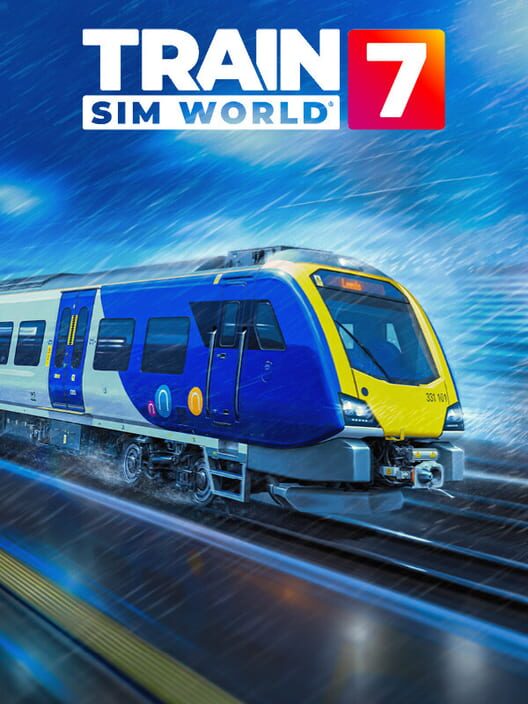
Train Sim World 7
Train Sim World 7 Beginner Guide: How to Start Driving
Start Train Sim World 7 with the Training Center and Simplified Controls, then learn Scenarios, Timetable, Free Roam, safety systems, and freight.
Price Comparison
Train Sim World 7 is approachable for new players if you begin with its Training Center, use Simplified Controls, and learn through guided Scenarios before tackling a full timetable service. The simulation can become detailed, but you do not need to master every train or safety system on your first session. Start with one route, follow the prompts, and build up from basic movement and station stops to more demanding passenger and freight work.
Train Sim World 7 includes a Free Starter Edition with the Training Center and starter locomotives, while the Standard Edition adds three routes: Miami - Boca Raton, Airedale & Wharfedale, and Nürnberg - Würzburg. The official game site describes the series as offering commuter, freight, and high-speed experiences, so the best first choice depends on whether you want a calm passenger run, a more technical freight task, or faster German services.
Begin with the Training Center
The Training Center is the right first stop because it lets you learn fundamental driving tasks without immediately managing a long route or a busy timetable. Use it to become comfortable with entering the cab, setting up a train, controlling power and braking, and stopping accurately.
Do not rush past the training material just because you have played another driving game. Train simulators are built around momentum, braking distance, route awareness, and procedures. A train can take substantial distance to slow down, especially when hauling freight or travelling at speed. Learning how the game communicates upcoming objectives is more valuable than trying to drive quickly from the outset.
Focus on a repeatable routine: prepare the train, confirm your next instruction, move away smoothly, watch the route ahead, begin braking early, and stop without abrupt corrections. Once that flow feels natural, the rest of the game becomes easier to absorb.
Use Simplified Controls First
Train Sim World 7 introduces Simplified Controls to help new players get moving while retaining the option to use the full simulation later. This makes it the most sensible starting setting for players who want to understand a route and basic train handling before dealing with every cab control.
Simplified Controls are not a substitute for learning how trains behave. Use them to reduce the number of systems you must manage at once, then concentrate on throttle application, braking, speed limits, stopping points, and the next objective. As you gain confidence, move toward the more detailed controls on a train-by-train basis rather than trying to learn the entire cab at once.
Different locomotives and multiple units do not all operate in precisely the same way. Treat a new vehicle as a new lesson. Run its tutorial or a short Scenario before committing to a long Timetable service, particularly when moving between US, UK, and German routes.
Choose Scenarios Before Timetable Services
For a first proper journey, select a Scenario. Dovetail describes Scenarios as hand-built experiences with instructions, objectives, and prompts. They are designed to introduce controls, unusual conditions, and route-specific tasks in a structured format.
This matters because a Scenario gives you a clear purpose. Instead of being dropped into a railway day and deciding what to do, you receive the context needed to learn: where to go, what job is expected, and which actions matter next. When you make a mistake, restart the Scenario or repeat it. Repetition is useful in a simulator because it helps you recognize braking points, station approaches, and operating sequences.
What to practice in a Scenario
- Starting smoothly without using more power than the train needs.
- Reading the next objective before it becomes urgent.
- Reducing speed early enough for a controlled stop.
- Completing passenger or freight tasks in the instructed order.
- Recognizing which cab systems the selected service expects you to use.
Do not judge a run only by whether it ends successfully. A clean, repeatable stop and a calm approach to each task are stronger foundations than finishing a route while constantly making last-second corrections.
Move to Timetable Mode When You Want a Full Railway Day
Timetable mode is the next step after guided Scenarios. It places you in scheduled passenger, freight, and AI traffic across a route, allowing you to choose a service and follow its timetable. This is where Train Sim World 7 starts to feel like an active railway rather than a sequence of isolated lessons.
Choose a short service first. A shorter run gives you room to learn the route rhythm without turning a small error into a long, frustrating session. Passenger services are often a practical way to practice regular stops and time awareness. Freight work can be more deliberate and technical, especially when switching or managing longer, heavier trains.
Before departure, check the service objective and take a moment to understand the first part of the route. During the journey, avoid focusing only on the clock. Being on time is useful, but a controlled drive that obeys the service requirements is a better goal for a new player.
Learn One Route at a Time
The Standard Edition contains three new routes with distinct operating styles. Miami - Boca Raton focuses on South Florida Tri-Rail commuter operations and also includes local freight activity. Airedale & Wharfedale combines northern English passenger services with quarry industry work. Nürnberg - Würzburg covers German regional and long-distance rail operations.
Rather than jumping constantly among all three, pick the route that best matches what you want to learn. Miami is a natural choice for players interested in commuter services and US equipment. Airedale & Wharfedale offers British passenger operations alongside industry-focused tasks. Nürnberg - Würzburg is suited to players who want to explore German rail and higher-speed services.
Stay on that route until you can complete a few services comfortably. Familiarity with stations, gradients, and the general pace of the line reduces your workload. You can then spend more attention on driving technique instead of rediscovering the environment every time.
Take Safety Systems One Step at a Time
Train Sim World 7 can enable safety systems by default, including systems such as AWS and PZB on trains that use them. These systems add realism but can also make early sessions demanding if you do not yet understand their warnings and interventions.
There is no need to force full safety-system operation immediately. Start with the level of assistance that lets you understand basic driving. When that feels comfortable, learn one system on one route and train type. Read the relevant in-game guidance, use a short Scenario or service, and pay attention to what triggers a warning and what response is required.
Do not assume that a procedure from one country applies everywhere. Train Sim World 7 represents railways in different regions, and their operational systems differ. Progress is easier when you treat UK, German, and US safety and signalling practices as separate subjects.
Try Free Roam After You Understand the Basics
Free Roam lets players spawn trains, select routes, and create their own services across the network. It is useful once the core controls make sense because it gives you room to experiment without following a preset Scenario structure.
Use Free Roam for focused practice. Spawn a familiar train and test braking at different speeds. Explore a depot or station area. Compare how different locomotive types accelerate. It can also be a relaxed way to enjoy a route without the pressure of a timetable.
However, Free Roam is less effective than Scenarios for a complete beginner because it gives you fewer built-in instructions. Learn the fundamentals in Training Center and Scenarios, then use Free Roam to answer your own questions and develop confidence.
Approach Freight Hauler as a Later Challenge
Freight Hauler is a new mode built around freight operations. Dovetail says it allows players to marshal freight to destinations without fixed instructions or schedules, making choices about switching, shunting, and hauling as cars populate the route.
That freedom makes Freight Hauler appealing, but it also raises the workload. Start it after you are comfortable controlling speed, stopping accurately, and handling a train on a familiar route. Freight is especially useful for learning patience: heavy consists respond differently from passenger trains, and careful positioning matters when working with cars and yards.
Set yourself small goals. Begin by moving a limited set of cars rather than trying to optimize an entire operation. Learn the layout, keep movements controlled, and allow enough space to stop. The satisfaction of the mode comes from planning and precise execution, not speed.
Use Other Modes and Tools When You Are Ready
Train Sim World 7 also includes Conductor Mode on applicable trains, where players check tickets and work passenger doors between stations. This offers a different pace from driving and can help you notice how a service is organized.
Creators Club supports player-made liveries, scenarios, and train formations. The PC Editor is available as a developer tool for creating routes, locomotives, and more. These are optional parts of the experience, so do not feel that you must use them before you have learned to drive. They become more rewarding once you know the equipment and routes you want to customize.
Finally, Live Weather can bring real-world conditions into the game. Treat changing conditions as another reason to drive conservatively. A run that felt simple in clear weather may demand more attention when visibility or rail conditions change.
A Simple First-Session Plan
- Start in the Training Center and complete the available basic lessons.
- Enable Simplified Controls while learning your first train.
- Play a guided Scenario on one route.
- Repeat a short Scenario until your stops and objective handling feel consistent.
- Choose a short Timetable service on the same route.
- Try Free Roam for low-pressure practice.
- Introduce detailed controls and safety systems gradually.
- Move on to Freight Hauler, Conductor Mode, or a different route when you want a new challenge.
The key to enjoying Train Sim World 7 is to set an appropriate level of complexity. The game supports a relaxed rail journey, but it also has room for detailed procedures, active timetables, safety systems, and self-directed freight work. Begin with the guided tools, learn one operating style at a time, and let the simulation become deeper as your confidence grows.
Sources
FAQ
Frequently Asked Questions
What should beginners do first in Train Sim World 7?
Begin with the Training Center, use Simplified Controls, and complete guided Scenarios before attempting longer Timetable services.
Does Train Sim World 7 have a free way to start?
Yes. The official site states that the Free Starter Edition includes the Training Center and starter locomotives.
What is the best game mode for learning Train Sim World 7?
Scenarios are the best starting mode because they provide clear instructions, objectives, and prompts while teaching route and train-specific tasks.
Should new players enable safety systems in Train Sim World 7?
Learn basic driving first, then introduce safety systems gradually. Systems vary by country and train, so practice one at a time on short services.
What is Freight Hauler in Train Sim World 7?
Freight Hauler is a freight-focused mode where players marshal, switch, shunt, and haul rail cars to destinations without fixed schedules or instructions.
Platforms
PC (Microsoft Windows), PlayStation 5, Xbox Series X|S
Genres
Simulator
Game Modes
Single player
Player Perspectives
First person
Game Engines
Unreal Engine 4
Companies
Dovetail Games
Links
Release Dates
Media
User Reviews
Similar Games

Outer Wilds

Airships: Conquer the Skies

Drizzlepath: Deja Vu

Crime Scene Cleaner
Gas Station Simulator

Avowed

Madison
Catsploration

Songs of Glimmerwick

Coin Pusher Casino

Parcel Simulator

Hermit and Pig
Sand: Raiders Of Sophie

Nature

EA Sports WRC

Draco and the Seven Scales

Supermarket Simulator

The Crimson Maid

Buckshot Roulette