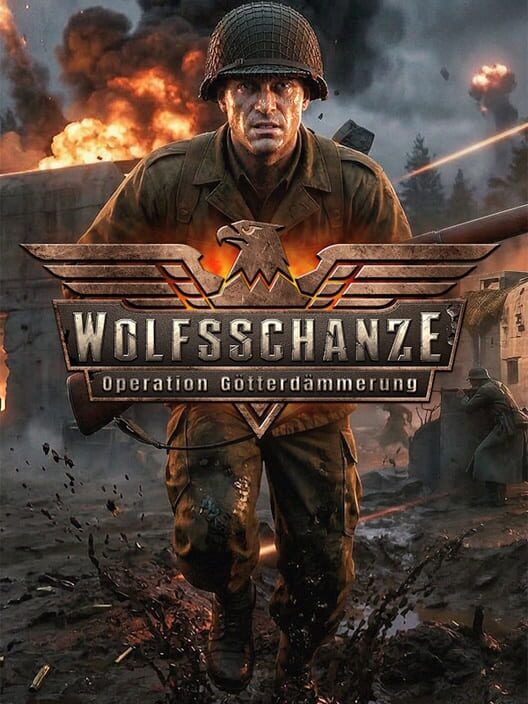
Wolfsschanze: Operation Götterdämmerung
Wolfsschanze: Operation Götterdämmerung System Requirements
The PC system requirements for Wolfsschanze: Operation Götterdämmerung, including minimum and recommended hardware, storage, Windows versions, and practical buying advice.
Price Comparison
Wolfsschanze: Operation Götterdämmerung requires a 64-bit version of Windows, 12 GB of RAM, and 15 GB of free storage at minimum on PC. Its listed minimum graphics hardware is an NVIDIA RTX 2070 or AMD RX 6700 XT, while the recommended specification raises memory to 24 GB and names an NVIDIA RTX 4060 or RTX 5060. Before buying, compare your exact processor, graphics card, installed RAM, operating system, and available drive space with the official Steam requirements.
Released on October 15, 2026, Wolfsschanze: Operation Götterdämmerung is a single-player first-person shooter set around the Wolf's Lair in East Prussia in 1944. The Steam version is published by Markt+Technik Verlag GmbH and developed by Polygon Art. Its store listing notes that missions and AI behavior can increase CPU load depending on player actions, so meeting the minimum specification should be treated as an entry requirement rather than a guarantee of identical performance in every combat situation.
Wolfsschanze: Operation Götterdämmerung PC requirements
Minimum system requirements
- Operating system: Windows 10
- Processor: Intel Core i5-8400 or AMD Ryzen 5 2600
- Memory: 12 GB RAM
- Graphics: NVIDIA RTX 2070 or AMD RX 6700 XT
- DirectX: Version 11
- Storage: 15 GB available space
- System type: 64-bit processor and operating system required
Recommended system requirements
- Operating system: Windows 11
- Processor: Intel Core i7-12700 or AMD Ryzen 5 5600X
- Memory: 24 GB RAM
- Graphics: NVIDIA RTX 4060 or NVIDIA RTX 5060
- DirectX: Version 12
- Storage: 15 GB available space
- System type: 64-bit processor and operating system required
The listed storage figure is the available-space requirement at the time of checking. It is sensible to retain extra free capacity beyond 15 GB for downloads, patches, shader caches, save data, and normal Windows operation. The store page does not state whether an SSD is mandatory, so do not assume one is required solely from the published specification.
Can your PC run the game?
Start with the items that cannot be solved through graphics settings alone: operating system, 64-bit support, processor generation, installed RAM, and graphics-card class. A PC running a 32-bit operating system does not meet the stated requirement. Likewise, a machine with 8 GB of RAM is below the official minimum, even if its processor or GPU appears competitive.
For the processor, the minimum list names either an Intel Core i5-8400 or an AMD Ryzen 5 2600. The recommended list moves to an Intel Core i7-12700 or AMD Ryzen 5 5600X. These are the official reference parts, not a published ranking of every alternative CPU. If your chip has a different name, check its model in Windows and compare carefully rather than relying only on branding such as Core i5, Core i7, or Ryzen 5.
Graphics requirements are also more demanding than the lightweight system requirements sometimes associated with older shooters. The official minimum calls for an RTX 2070 or RX 6700 XT, and the recommended list specifies an RTX 4060 or RTX 5060. The publisher has not provided an official resolution, preset, or frame-rate target alongside those PC requirements. As a result, it would be inaccurate to promise a particular frame rate or image-quality setting for either tier.
Why the CPU requirement deserves attention
The Steam page includes an additional note that processor requirements are indicative and may vary because dynamically generated missions and AI behavior can significantly increase load according to player actions. That statement matters when evaluating a borderline CPU. A computer that meets the baseline may still face heavier demand in busier moments, rather than delivering one fixed level of CPU usage throughout a mission.
For that reason, the recommended processor should be the more relevant target for players planning to keep background applications open, record gameplay, or simply build in some performance headroom. This is practical guidance rather than an official performance claim: the published listing does not provide benchmark results, CPU utilization figures, or test scenes.
Memory, DirectX, and storage explained
Wolfsschanze: Operation Götterdämmerung lists 12 GB RAM as its minimum and 24 GB RAM as its recommended amount. Check total installed system memory, not only the amount currently free in Task Manager. Memory may be listed as 16 GB, 24 GB, or 32 GB in a typical PC configuration, while 12 GB is still the stated threshold for the minimum specification.
DirectX 11 is listed for the minimum tier and DirectX 12 for the recommended tier. DirectX availability is tied to both Windows configuration and graphics-driver support, so keeping Windows and GPU drivers current is a reasonable pre-launch step. However, the store page does not publish a setting-by-setting guide, ray-tracing requirements for PC, or a supported-upscaling list. Those details should not be assumed without a later developer or store update.
The game needs 15 GB of available storage. Available space is not the same as a drive's advertised capacity: a 500 GB drive can still fail the requirement if it is nearly full. Check the destination drive where Steam is installed or where you intend to create the game library. Leave room above the minimum so an update does not fail because the drive is full.
What the official requirements do and do not confirm
The official PC listing confirms Windows 10 as the minimum operating system and Windows 11 as the recommended operating system. It also confirms single-player support, Steam Achievements, and Family Sharing on Steam. The listed language support includes English interface, full audio, and subtitles, with additional interface and subtitle languages available.
The requirements do not establish every performance detail a prospective buyer may want. They do not name a target resolution, graphics preset, frame-rate floor, laptop-GPU equivalent, Steam Deck compatibility result, or mandatory SSD requirement. They also do not provide a complete set of acceptable substitute components. When a specification is missing, it is better to assess the game using the published component list and wait for verified testing or an official update than to treat assumptions as confirmed compatibility.
Console versions and PC requirements
PC hardware requirements apply only to the Windows release. The game is also listed for PlayStation 5 and Xbox Series X|S, where players do not need to compare CPU, GPU, RAM, or DirectX versions. The Xbox store identifies the game as optimized for Xbox Series X|S and lists single-player support, while the PlayStation Store lists a PS5 version for one player. Console feature labels should not be used to infer equivalent PC performance settings.
If you are deciding between PC and console, the clearest PC advantage is the ability to check compatibility before purchase using the component list above. For a PC near or below the minimum, avoid assuming that lowering settings will overcome a missing requirement. For a PC that meets or exceeds the recommended tier, the official listing provides a stronger hardware starting point, but it still does not promise a specific resolution or frame rate.
Bottom line
For the Windows version of Wolfsschanze: Operation Götterdämmerung, the essential checklist is a 64-bit PC, Windows 10 or newer, at least an Intel Core i5-8400 or AMD Ryzen 5 2600, 12 GB of RAM, an RTX 2070 or RX 6700 XT, DirectX 11, and 15 GB of free storage. The recommended target is Windows 11, a Core i7-12700 or Ryzen 5 5600X, 24 GB of RAM, and an RTX 4060 or RTX 5060 with DirectX 12. Because the developer notes that mission generation and AI can raise CPU load, players near the minimum should give the processor requirement particular attention.
Sources
FAQ
Frequently Asked Questions
What are the minimum PC requirements for Wolfsschanze: Operation Götterdämmerung?
The minimum requirements are Windows 10, a 64-bit processor and operating system, an Intel Core i5-8400 or AMD Ryzen 5 2600, 12 GB RAM, an NVIDIA RTX 2070 or AMD RX 6700 XT, DirectX 11, and 15 GB of available storage.
How much storage does Wolfsschanze: Operation Götterdämmerung need?
The official Steam listing requires 15 GB of available storage space. Keeping additional free space for updates and normal system use is advisable.
Does Wolfsschanze: Operation Götterdämmerung require a 64-bit PC?
Yes. Both the minimum and recommended Steam specifications require a 64-bit processor and a 64-bit operating system.
What is the recommended GPU for Wolfsschanze: Operation Götterdämmerung?
The recommended specification lists an NVIDIA RTX 4060 or NVIDIA RTX 5060. The official listing does not state a resolution, graphics preset, or frame-rate target for that tier.
Is Wolfsschanze: Operation Götterdämmerung available on consoles?
Yes. Official store listings confirm versions for PlayStation 5 and Xbox Series X|S, in addition to the Windows PC release.
Platforms
PC (Microsoft Windows), Nintendo Switch, PlayStation 5, Xbox Series X|S
Genres
Shooter
Themes
Action, Historical, Warfare
Game Modes
Single player
Player Perspectives
First person
Companies
Markt+Technik Verlag