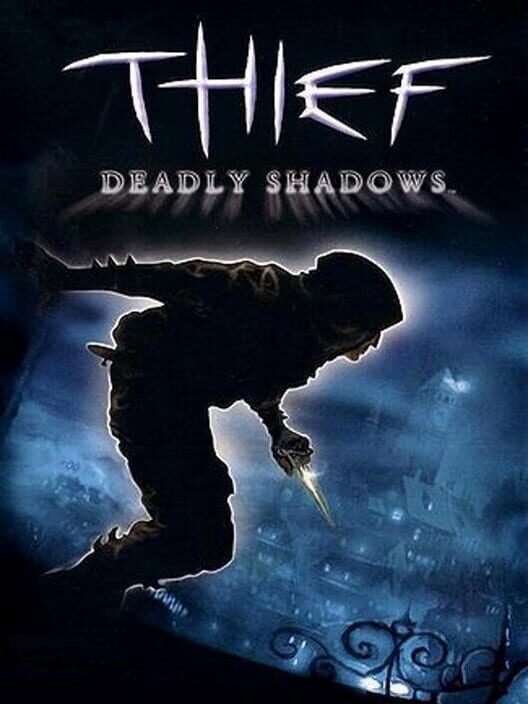
Thief: Deadly Shadows
Thief: Deadly Shadows System Requirements and PC Compatibility
Find the current listed PC requirements for Thief: Deadly Shadows, understand the differences between Steam and GOG, and prepare a modern Windows PC.
Price Comparison
Thief: Deadly Shadows has very low hardware demands by current PC standards, but its age makes storefront compatibility information more important than raw CPU or graphics power. The original Steam requirements call for a 1.5 GHz Pentium IV-class processor, 256 MB of RAM, a Direct3D 9 graphics card with 64 MB of video memory, and 3 GB of free drive space. GOG's current product page instead lists Windows 10, a 1.8 GHz processor, 2 GB RAM, DirectX 9.0c-compatible 3D graphics, and 1 GB of storage. For a player using a modern Windows desktop or laptop, the practical conclusion is simple: nearly any current PC exceeds the hardware target, but the GOG listing is the clearer current statement of supported operating-system compatibility.
Thief: Deadly Shadows PC requirements at a glance
The Steam store page preserves the game's original-era minimum and recommended specifications. Its minimum configuration is an IBM PC-compatible machine running Windows 2000 or Windows XP, a 1.5 GHz Intel Pentium IV or equivalent AMD Athlon XP processor, 256 MB of system memory, 64 MB of video memory, Direct3D 9.0 with Pixel Shader 1.1, a DirectSound 9-compatible sound card, 3 GB of free disk space, plus a keyboard and mouse.
Steam's recommended specification increases the processor target to a 2.0 GHz Pentium IV or equivalent Athlon XP, memory to 512 MB, and video memory to 128 MB. Those figures describe the hardware the game was designed around in 2004 rather than a meaningful performance bar for a modern gaming PC.
GOG lists a different, modernized minimum requirement for its edition: Windows 10, a 1.8 GHz processor, 2 GB RAM, a DirectX 9.0c-compatible 3D graphics card, and 1 GB HDD space. GOG also identifies the game as a Windows release and states that its version can be installed through an offline installer without requiring GOG Galaxy.
Why Steam and GOG list different requirements
The two storefronts are not necessarily describing identical installation expectations. Steam displays the original technical requirements, including operating systems that are now obsolete. Its page also includes a platform-wide notice that the Steam client itself supports Windows 10 and later as of January 1, 2024. That client notice does not, by itself, mean every older game has been updated or explicitly tested for every modern Windows configuration.
GOG's page is more useful for someone specifically asking whether a current Windows PC is supported, because it directly lists Windows 10 in the game's requirements. The GOG version also has DRM-free offline installation available. That does not make the Steam version unusable on a modern computer; it means the two stores publish different compatibility statements, and buyers should avoid treating the 2004 Steam specification as a current operating-system support list.
Storage is another example. Steam says to reserve 3 GB, while GOG lists 1 GB. If drive space is limited, plan for the larger number. It gives room for the installed game, storefront files, save data, and any future troubleshooting without relying on an exact installation-size estimate.
Can a modern PC run Thief: Deadly Shadows?
From a component-performance perspective, most modern Windows PCs should have vastly more CPU speed, memory, graphics capability, and storage than the published requirements. The important caveat is that old PC games can encounter issues unrelated to performance: display modes, legacy graphics behavior, input configuration, overlays, or software interactions may matter more than whether a system has a powerful GPU.
For that reason, do not use the original 64 MB or 128 MB video-memory figures as proof that every modern setup will behave identically. They only establish the game's historical minimum and recommended hardware targets. Start with the unmodified store version, use the in-game video settings, and change one setting at a time if you encounter a problem. This creates a clear baseline before adding third-party files or changing compatibility settings.
Desktop and laptop considerations
The Steam page says that Thief: Deadly Shadows does not support play on laptop computers. That statement belongs to the original store requirements and should be read as a historical warning from the game's release period, not as a verified claim that all current laptops are incompatible. Modern laptop hardware varies widely, and neither the old Steam text nor the GOG requirements provides a current, model-by-model laptop certification list.
For a laptop owner, the dependable information is limited: GOG officially lists Windows 10 and modest hardware requirements; Steam retains the original laptop warning. Before purchasing specifically for a laptop, check the storefront's current refund terms and test the game promptly on the intended machine. A keyboard and mouse are the safest baseline because Steam's official requirements explicitly name them as the required controls.
Graphics settings that affect performance
Thief: Deadly Shadows uses a lighting and shadow system that is central to both its visual presentation and stealth gameplay. Steam and GOG describe dynamic shadows cast by characters and objects, while the official game manual shows video options for brightness, resolution, shadow detail, and bloom. Those are the settings to inspect first if the game starts but does not perform or look as expected.
Lowering shadow detail is the most sensible first adjustment on a system that struggles with the game, because shadows are a named graphics setting and an important part of the rendering workload. Resolution and bloom are additional variables worth testing. Keep brightness separate from performance tuning: brightness affects how easily you can read dark scenes, whereas it is not presented as a performance option in the manual.
Because stealth relies on light and darkness, avoid reducing visual settings blindly. Make a small change, enter a playable area, and check whether you can still distinguish dark cover, illuminated patrol routes, and interactive objects. The best configuration is not merely the highest frame rate; it is a stable presentation that still makes the game's light-and-shadow feedback readable.
Controls and setup expectations
Steam's requirements specify keyboard and mouse, so that is the documented PC control method to prepare. The game's manual includes dedicated control and input sections, and its options interface separates audiovisual settings from control-related settings. Spend a few minutes reviewing key bindings before beginning a mission, especially if you are returning to a game designed around early-2000s PC conventions.
The official store descriptions also emphasize Garrett's thief tools, including lock picks, a blackjack, arrows, wall-climbing gloves, oil flasks, flash bombs, and a dagger. Since those tools serve different situations, accessible bindings matter. A confusing input setup can make a game appear harder or less responsive than it is.
Do not assume modern controller support, Steam Deck support, cross-save, cloud saves, or a particular third-party modification from the published requirements alone. The official Steam listing documents keyboard and mouse, while GOG's product page describes optional GOG Galaxy use for features including achievements and cloud saves. Storefront features and the base game's documented inputs should be checked separately before purchase.
Best purchase checklist
- Use a Windows PC. GOG explicitly lists Windows 10 support for its current edition.
- Reserve at least 3 GB of free space to cover the larger of the official store requirements.
- Have a keyboard and mouse available for the documented PC control scheme.
- Compare the current Steam and GOG product pages before buying, as their listed system requirements differ.
- Test video settings such as resolution, shadow detail, bloom, and brightness early in the game.
- For a modern laptop, treat the old Steam laptop warning cautiously and test the purchased version within the seller's applicable refund period.
In short, Thief: Deadly Shadows is easy to meet on paper but deserves a careful modern-PC setup. The GOG version has the clearest current Windows 10 requirement, while Steam remains valuable for its original technical specification and official manual. Check the store page that matches the version you intend to buy, begin with keyboard and mouse, and adjust the built-in visual options before looking for outside fixes.
Sources
FAQ
Frequently Asked Questions
What are the minimum system requirements for Thief: Deadly Shadows on Steam?
Steam lists Windows 2000 or XP, a 1.5 GHz Pentium IV or equivalent processor, 256 MB RAM, 64 MB video memory, Direct3D 9.0 with Pixel Shader 1.1, and 3 GB of free space.
Does Thief: Deadly Shadows support Windows 10?
GOG's current product page explicitly lists Windows 10 as the operating system requirement for its edition. Steam displays the game's original Windows 2000 and XP-era requirements.
Can a modern PC run Thief: Deadly Shadows?
Most modern Windows PCs exceed the published CPU, RAM, graphics, and storage requirements by a large margin. Compatibility behavior can still depend on the store version, display setup, and in-game settings.
How much storage does Thief: Deadly Shadows need?
Steam lists 3 GB of free hard-disk space, while GOG lists 1 GB. Reserving 3 GB is the safer choice.
Does Thief: Deadly Shadows require a controller?
No. Steam's official requirements specify a keyboard and mouse. The published requirements do not establish modern controller support as the documented baseline.
Platforms
PC (Microsoft Windows)
Genres
Shooter, Simulator, Adventure
Themes
Action, Fantasy, Stealth
Game Modes
Single player
Player Perspectives
First person, Third person
Game Engines
Unreal Engine 2
Companies
Ion Storm, Eidos Interactive, Square Enix, Eidos Montréal